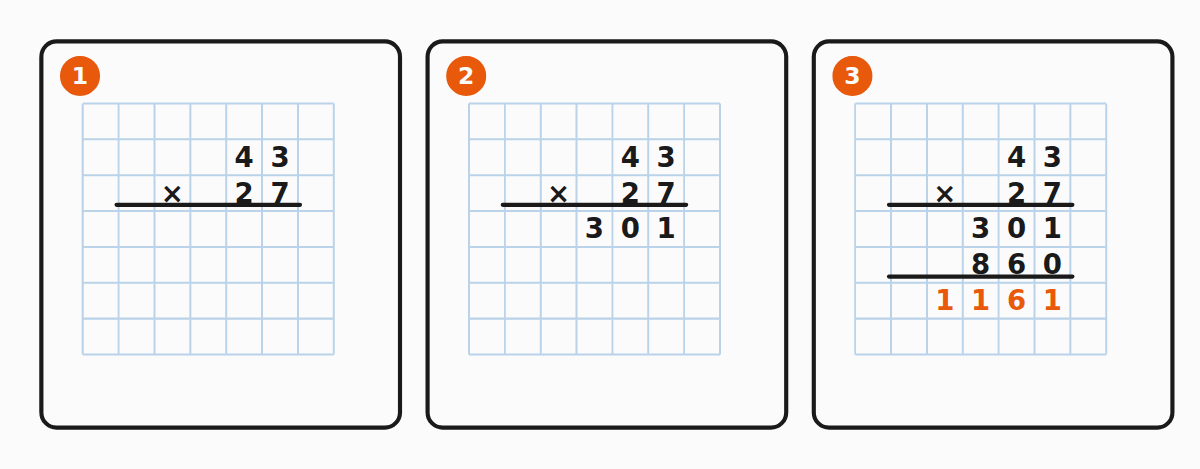
This is the recipe for multiplying two multi-digit numbers in columns. It works the same way whether the bottom factor has two, three or four digits — just with more partial products.
Set up the layout
- Write the larger factor on top, the smaller one below — right-aligned.
- Write a multiplication sign on the left of the bottom factor.
- Draw a horizontal line under both factors.
For example :
Step 1 – multiply by the ones digit
Multiply the top factor by the rightmost digit of the bottom factor. Write the result on the line just below the bar, right-aligned with the bar.
:- → write , carry .
- , plus the carried → . Write , carry .
- , plus → . Write , carry .
- , plus → . Write .
Result: .
Step 2 – multiply by the tens digit, shifted
Multiply the top factor by the next digit of the bottom factor and write the result one place to the left.
. Place it shifted by one column:Steps 3 and 4 – more digits, more shifts
If the bottom factor has more digits, repeat the same step for hundreds (shift two), thousands (shift three), and so on. The shift always equals the position of the digit from the right.
For a 3-digit bottom factor you get three partial products; for a 4-digit one, four partial products.
Final step – add the partial products
Draw another horizontal line under the partial products and add them column by column, right to left, carrying as needed.
For our example:
So .
Width of the fields
Two practical reminders for the layout:
- Each partial-product line can be one digit wider than the top factor — leave a slot on the left for a carry from the multiplication. For example, is 5 digits, while the top factor has only 4.
- The final sum can be as wide as . For two 4-digit factors that is up to 8 digits.
Read more
- Multiplication by a multi-digit number – guide
- The principle of long multiplication
- Worked examples and common mistakes